Apple AirPods Pro 3 Review
The AirPods Pro 3 are surprisingly competitive OTC hearing aids when tuned correctly.)
)
Our expert team selects and tests products rigorously. We may earn commissions if you buy through our links. Here's how we keep reviews independent.
Buy at Amazon
The Apple AirPods Pro 3 are excellent active noise-cancelling earbuds, and they're OTC hearing aids that offer exceptional value.
The AirPods Pro 3 feature the same FDA-approved hearing aid functionality as their predecessor, the AirPods Pro 2, but Apple has improved a few things. As a result, the Pro 3 received a Hearing Tracker score of 4.1 out of 5, while the Pro 2 only scored a 3.8 out of 5. After many hours of testing in the Hearing Tracker lab, Steve also found one specific setting that took the Pro 3's hearing aid performance from "just okay" to "impressive."
Let's explore how the AirPods Pro 3 perform as hearing aids, how they compare to the Pro 2, and how you can get the most out of them.
Pricing
Verified seller for Apple AirPods Pro 3.

Amazon
Easy Returns
Amazon offers an extensive range of hearing aids and hearing-related products through its online marketplace. With the FDA’s 2022 approval of over-the-counter (OTC) hearing aids, more brands have begun selling their devices on Amazon, making it a convenient place to shop. However, consumers should be mindful of the differences in product quality, seller support, and after-purchase services when buying hearing aids online. Amazon also often offers a shorter return period than most first-party sellers.
- Variety of Brands and Sellers
- Convenient Shopping Experience
Never miss a price drop
Get notified when prices drop for this product
AirPods Pro 3 Build, Design, and Comfort
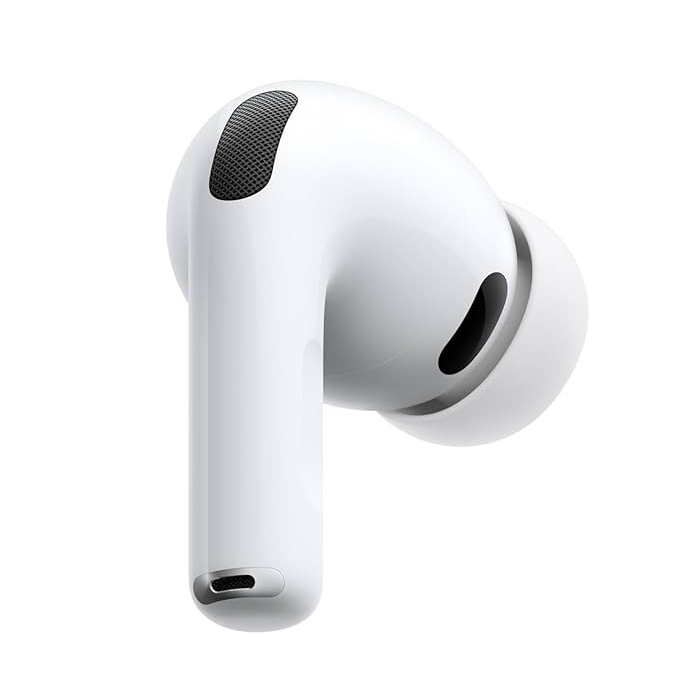
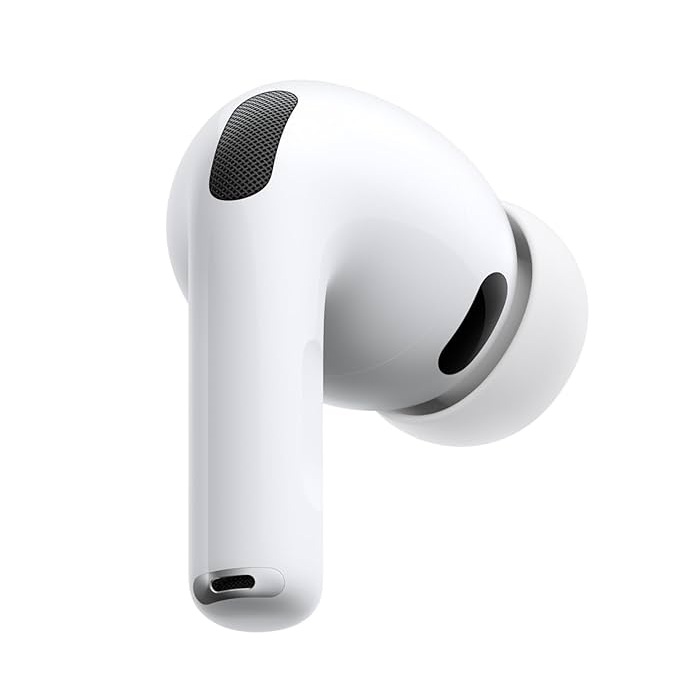
The AirPods Pro 3 look very similar to the Pro 2. The size, shape, and feel of both the earbuds and their charging cases are almost identical. Only minor differences, like the reset button on the back of the case or the new USB-C charging port on the AirPods Pro 3 case, reveal which is which.
:format(webp))
The AirPods Pro 3 were upgraded to IP57, slightly improving their dust and water resistance over the Pro 2's IP54 rating. However, while they can resist submersion in water (up to 3 feet for up to 30 minutes), meaning you could use them in the shower or pool, they're not fully water resistant. For reference, the best water-resistant hearing aids carry an IP68+ rating.
The AirPods Pro 3 come with foam-infused ear tips. While these do provide better sound reduction when worn properly, Steve struggled with wearing his AirPods. Whether due to the new shape or the foam-infused ear tips, retention just wasn't there, and he frequently had to reseat them in his ears, which led to mild discomfort during longer uses. Many other users reported similar issues online, some even experiencing abrasions in their ear canals and bleeding, a side-effect of wearing AirPods Pro 3 that briefly trended as #bloodgate. Steve didn't suffer any injuries himself, but the discomfort was noticeable.
:format(webp))
AirPods Pro 3 Battery Life
One of the biggest complaints with the previous generation AirPods Pro 2 was battery life. With only up to eight hours per charge using transparency mode, they were more suitable for situational use, rather than all-day use. The AirPods Pro 3 offer up to 10 hours of battery life per charge in transparency mode with the hearing aid feature. Note that Apple only advertises up to eight hours, but that's with active noise cancelling enabled. Either way, the AirPods' battery life is still much lower than what the best rechargeable hearing aids achieve, but for a set of earbuds, it's respectable, and it should get you through the day.
:format(webp))
The AirPods Pro 3 MagSafe charging case extends the battery life to up to 24 hours away from a plug.
Controlling the AirPods Pro 3
Unlike most OTC or prescription hearing aids, you won't find a dedicated AirPods hearing aid app. Everything lives inside your iPhone's native settings. And while that can be a strength, the current implementation of those settings might be the AirPod's biggest weakness.
:format(webp))
Apple nails the "it just works" experience for pairing. Open the case and your phone recognizes your buds instantly.
In contrast, to access the hearing aid settings, you have to follow this path:


Settings > Your AirPods > Hearing Assistance > Enable Hearing Aid > Adjustments
You can also get there via the Control Center by swiping from the top or bottom of your screen, depending on your iPhone.
However, let's say you are using noise cancellation because you were flying and now you want to switch back to transparency and the hearing aid mode. Well, to do this, you must go back to your native phone settings, select your AirPods, and switch your listening mode. You can also do this from the Control Center, but it's accessed from a separate menu by pressing the volume control slider, and then selecting the listening mode icon on the bottom left of your screen. That's a lot, and it comes with a steep learning curve for navigation.
:format(webp))
Once you're in, the controls are useful. You have volume control or amplification. There's left-right ear balance and a darker-brighter tone control, which shifts emphasis towards either bass or speech clarity. There's also ambient noise reduction and conversation boost.
Together, these controls are powerful and effective, but access and discoverability could be much better. Apple treats AirPods primarily as earbuds, which is fair, but the hearing features feel like a hidden corner rather than a user-friendly experience for those accessing this accessibility feature. That's a real shame because once set up right, AirPods Pro 3 can be surprisingly capable as hearing aids.
How the AirPods Pro 3 Perform as Hearing Aids
All this customization begs the question, can AirPods Pro 3 actually function as hearing aids and improve speech clarity? At around $250, they're fairly inexpensive. So, how far can they really go?
How We Test in a Nutshell
Steve ran multiple tests, tried different settings, and evaluated the AirPods Pro 3 as both hearing aids and earbuds through our standard Hear Advisor lab protocols. These include industry-standard measures and predictive models that estimate real-world performance. Here is what we found.
Initial vs. Tuned Fit
When we look at the initial fit, meaning the out-of-the-box hearing aid setup after entering our audiogram, enabling conversation boost, and turning on ambient noise reduction, performance wasn't great. In fact, the AirPods Pro 3 actually scored slightly lower than the previous Pro 2.

For our tuned test, we increased the default volume and pushed the darker-brighter control to the brightest setting. After doing this, the audio performance improved substantially, essentially matching the previous generation.
These are respectable results, especially given a $250 earbud that also does a thousand other things.
AirPods Pro 3 | AirPods Pro 2 | Mean | |
|---|---|---|---|
Speech in Quiet (initial) | 0.9 | 1.8 | 2.84 |
Speech in Quiet (tuned) | 3.5 | 3.8 | 3.05 |
Speech in Noise (initial) | 1.2 | 0.8 | 1.27 |
Speech in Noise (tuned) | 2.7 | 2.6 | 1.66 |
Speech in Quiet (initial) | Speech in Quiet (tuned) | Speech in Noise (initial) | Speech in Noise (tuned) | |
|---|---|---|---|---|
AirPods Pro 3 | 0.9 | 3.5 | 1.2 | 2.7 |
AirPods Pro 2 | 1.8 | 3.8 | 0.8 | 2.6 |
Mean | 2.84 | 3.05 | 1.27 | 1.66 |
Tweaking Ambient Noise Reduction
Here's where things get really interesting, and to us, this is the biggest surprise of this entire review. The one setting that dramatically affects AirPods hearing aid performance is ambient noise reduction.


Now, you might think that turning this up would help reduce unwanted noise and make speech easier to hear, but that is not what happens. Ambient noise reduction actually lowers all sounds, including speech. It makes the listening experience more comfortable, sure, but at the direct expense of clarity.
When Steve reduced ambient noise reduction to the lowest possible setting, amplification increased, speech clarity improved, and AirPods Pro 3 delivered far better performance. In fact, with this one change, AirPods reached levels that rival the better OTC devices and even rubbed shoulders with the audio performance of prescription hearing aids.
HOT TIP: If you're using your AirPods Pro 3 as hearing aids and need more clarity, turn ambient noise reduction down.
Pros
Impressive speech amplification, similar to prescription hearing aids, but only if tuned correctly Affordable compared to similar OTC hearing aids Improved battery life of up to 10 hours per charge Active occlusion compensation, which compensates for the earbud form factor and makes them feel more like hearing aids Integrated health features that go beyond hearing health, including hearing protection, fitness tracking, and heart rate monitoring Excellent earbud qualities, including exceptional audio streaming quality, spatial audio, and industry-leading active noise cancellation USB-C charging port (previously Thunderbolt), but doesn't ship with a charging cable
Cons
Unintuitive user experience with hearing-related settings buried behind multiple menus and split across different screens, particularly the hearing assistance feature and transparency mode Uncomfortable and poor retention, requiring frequent adjustments and creating discomfort when used for a longer period of time Earbud form factor can be awkward in social settings, when it's not clear the earbuds are used as hearing aids
Our AirPods Pro 3 Verdict
So are AirPods Pro 3 actually capable OTC hearing aids? Yes, based on our lab testing, they absolutely can be. But getting them programmed correctly takes a bit of work.
And as always, let us remind you that hearing care providers can help you program OTC devices, including AirPods. You may need to call around to find a clinic willing to do it, but based on the performance gains you might get, it can definitely be worth your time.
Dr Steve Taddei
Doctor of AudiologySteve Taddei, Au.D., merges his audio engineering degree from Columbia College Chicago with his doctorate in audiology from Northern Illinois University to advance hearing technologies and raise hearing loss awareness as the Lab Director at HearAdvisor. He also contributes consumer-focused hearing aid and earplug reviews at HearingTracker.com, and inspires future professionals through his adjunct faculty roles at several colleges, encouraging the next generation to discover and pursue their passions.
Tina Sieber, PhD
Health WriterTina Sieber is a technology journalist with over 10 years of experience and a PhD in Biochemistry. Following an episode of sudden one-sided hearing loss, she was diagnosed with a benign brain tumor in 2018. She has since started writing about hearing loss and reviewing hearing aids for major tech publications.
Dr Steve Taddei
Doctor of AudiologySteve Taddei, Au.D., merges his audio engineering degree from Columbia College Chicago with his doctorate in audiology from Northern Illinois University to advance hearing technologies and raise hearing loss awareness as the Lab Director at HearAdvisor. He also contributes consumer-focused hearing aid and earplug reviews at HearingTracker.com, and inspires future professionals through his adjunct faculty roles at several colleges, encouraging the next generation to discover and pursue their passions.